


Investor's Business Daily
4.41.25K Reviews
App Specs
- Version
- 7.20
- Updated On
- License
- Free
- Downloads
- 500,000+
- Developer
- Dow Jones & Company, Inc.
- Categories
- Finance
- Platform
- Android
Screenshots

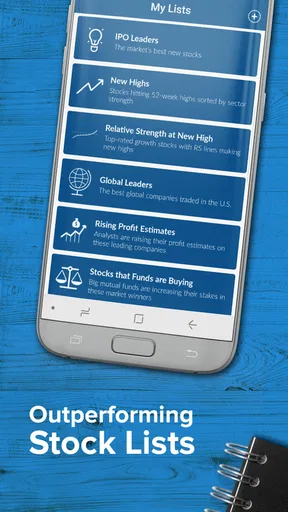
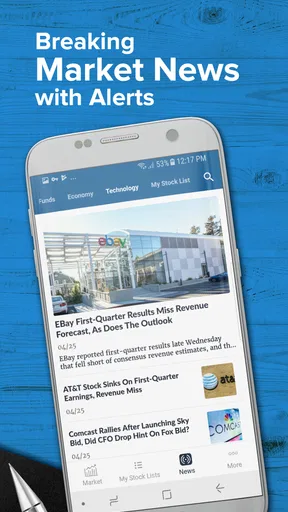
 Analysis by AppCompare
I find the most useful way to approach Investor’s Business Daily is as a research companion, not as a button that tells me what to buy. Its focus is market analysis and stock evaluation, so it suits someone who wants to examine ideas and follow market news on a phone. It is less compelling if all you need is a basic balance check or a place to glance at a quote and move on.
There is a practical distinction worth keeping in mind from the start: analysis can help organize a decision, but it cannot make the decision for you. I would use the app to investigate a company, compare what its signals suggest with my own plan, and decide what deserves more attention. I would not treat a rating, alert, or article as a promise about what a stock will do next.
Where new users can get stuck
The first potential snag is expectation. Investor’s Business Daily is a finance app from Investor’s Business Daily, LLC, but its emphasis is more specialized than that of a general-purpose money app. If you open it expecting a simple portfolio ledger, household budget, or automatic account overview, the stock-analysis approach may feel like the wrong starting point. It makes more sense when you arrive with a question about a market or a company.
The range of information can also feel like a lot if you are new to investing. Charts, ratings, and financial stories each answer different questions; they are not interchangeable shortcuts. I’d start with one company I already understand, look at its analysis, then read a related story. That gives the sections a purpose instead of turning the first session into a tour through every market term at once.
There is also a difference between using a free app and having access to every paid service connected with it. The app is free to download, while in-app purchases range from about $26 to $379 per item. I’d check the details of an offer before committing, especially if I only wanted occasional market context. A casual reader may not need a paid option, while someone who regularly uses deeper research may judge the cost differently.
Setup checks that make the first session easier
Investor’s Business Daily is listed for Android with a minimum operating-system requirement of version 6.0, and its current version is 7.15.6. Before troubleshooting an installation, I’d check that the phone’s software meets that requirement and that the app has finished installing. If the app is already installed but behaves oddly, closing and reopening it is a sensible first check before changing account details or making assumptions about the service.
When you sign in, take a moment to distinguish account access from the app itself. If a password is rejected, I would re-enter it carefully and use the account recovery route offered on the sign-in screen rather than repeatedly guessing. If you already use an account, signing in with the same one helps avoid the confusion of creating a second profile and then wondering where saved preferences belong.
Worth Reading Before You Choose

EA SPORTS FC Mobile 26 Is a Bigger Football Game, but It Takes Time

Flipboard Shows What News Apps Must Do Beyond the Feed

Switching to Android Auto Means Rethinking Your Driving Routine

Google Calendar Makes a Crowded Week Easier to Manage

Ludo King Makes the Most of the Minutes Between Plans

Baby Panda World Brings Quick Play to Modern Phones, but Its Game Library Feels Busy
For a useful first setup, choose a small watchlist rather than adding every ticker you recognize. A short list makes it easier to notice what changed and why a story might matter. I’d also decide whether I want alerts before enabling them: a notification is helpful when it points to something I intend to review, but a stream of prompts can turn market research into background noise.
A calmer workflow when something goes wrong
If a chart, article, or other page does not appear as expected, I would first check whether the problem is limited to that screen or affects the whole app. Backing out and reopening the section can help separate a temporary display issue from a broader sign-in or connection problem. I would avoid treating one slow load as proof that the underlying stock information is wrong.
When an alert seems missing, I’d check the watchlist and the alert settings before rebuilding everything. A notification only helps if it is connected to the stocks and changes I actually care about, and phone-level notification controls can also affect whether an app’s alerts are visible. If I’m unsure whether a setting is responsible, I’d make one change at a time and then observe the result rather than toggling several options at once.
For a frustrating session, a practical fallback is to note the company or market question you were researching, then return to it once the app is responding normally. That prevents a temporary interruption from becoming a rushed trading decision. I would also compare a key fact with another reputable source when the detail matters to a decision; using more than one source is sensible research, not a sign that a single screen must be defective.
When the app may not be the problem
Markets move quickly, but an app’s article, rating, or alert is still a particular kind of information, not a full explanation of your personal circumstances. A stock can be interesting on an analysis screen and still be unsuitable for someone’s time horizon, risk tolerance, or financial needs. I treat the app as a way to ask better questions, then look at the decision in the context of my own plan.
The audience rating is 4.4 from around 4,200 ratings, and the app has been installed over 100,000 times. It is rated Teen. Those figures offer a little context about its audience and reach, but they are not a substitute for deciding whether its research style fits you. I’d also remember that investing involves risk, so neither a rating nor a polished presentation removes the possibility of loss.
If the app’s information looks delayed or a screen will not refresh, I’d check the phone’s connection and try again before acting on an old view. If the same issue persists, waiting and checking another source is safer than making a time-sensitive decision from information that may not be current. That is especially important when a trade depends on a specific price or a sudden market move.
Who benefits most from this style of research
I think the app is most useful for an investor who likes to build a case before acting: someone who follows a handful of companies, reads market coverage, and wants analysis close at hand during the day. It can also help a newer investor learn how to frame research questions, provided they treat ratings as one input rather than a verdict. Starting with a company you can explain in plain language is a good way to keep the research grounded.
It is a weaker fit for someone who wants a hands-off service to manage investments, a straightforward budgeting tool, or a broker experience centered on placing trades. Those needs call for different tools. I would also skip it if you know you tend to react to every alert or headline; more market information is not automatically useful if it pushes you into decisions that do not match your plan.
Compared with a basic market-quote app, this one leans more toward analysis and editorial context than simply checking a price. Compared with a broad personal-finance app, it is narrower and more focused on stocks and markets. That focus is its advantage when you want to research an investment, but it also means it should not be expected to replace a complete financial toolkit.
A realistic routine, without turning every alert into action
Imagine you have a few minutes before work and want to check a company you have been following. I’d open its watchlist entry, review the available stock analysis, and read the relevant market coverage before deciding whether anything has changed in my view. If the app surfaces a reason to investigate further, I’d make a note and revisit it when I have time rather than trade while distracted over breakfast.
That routine makes the app’s immediacy useful without letting it dictate the pace of a decision. A watchlist can narrow the field; ratings can offer a screening clue; articles can add context. The useful work is connecting those pieces to a question you already have. If you have no reason to act, closing the app is a perfectly good outcome.
One non-obvious trade-off is that a concise article is easy to read quickly, but brevity does not mean it covers every factor that matters to your situation. I’d use a short story to identify what deserves follow-up, not as the last word on a company. Likewise, a stock score can help me sort a list, but I would still check the business, the price I am considering, and the risks I am willing to accept.
Cost, age rating, and choosing an alternative
The free download makes it easy to try the basic experience, but the in-app purchase range is wide enough that I would not assume every research feature is included at no cost. Before paying, I’d ask how often I actually use the app, what the specific purchase unlocks, and whether that information changes my research process. If I only check the market now and then, free sources may be enough; if I depend on structured analysis, a paid option may be more relevant.
The Teen content rating is another small but useful consideration for families sharing a device. It is a finance product, but market material can still be aimed at readers who are ready to think carefully about investing and risk. I would not treat the age label as financial guidance or assume a younger user should make investment decisions independently.
For someone who mainly wants live prices, a simpler quote-focused alternative may be quicker. For someone whose priority is placing orders, a brokerage app is the more direct choice. And if the goal is to understand household spending, a budgeting app is better suited. I see Investor’s Business Daily as a complement to those tools when the missing piece is research, not as a replacement for all of them.
Released on January 24, 2017, it has had time to establish a recognizable role as an investing resource, while its version 7.15.6 gives Android users a concrete compatibility detail to check before installing. Neither longevity nor a version number tells me whether a particular paid feature will suit my needs, so I would still assess the app by the quality and usefulness of the research I actually reach in my own routine.
Ever found yourself drowning in financial jargon or feeling overwhelmed by the constant flood of market updates? Enter Investor's Business Daily. If you’re like me, always on the lookout for a reliable source to keep track of your investments while sipping your morning coffee, this app might just become your new best friend.
Getting Started with Investor's Business Daily
First things first, downloading Investor's Business Daily is a breeze. Available on both Android and iOS, you can grab it from the App Store or Google Play in no time. Once installed, the app greets you with a sleek, user-friendly interface. It’s like stepping into a world where stock market chaos is neatly organized into tidy sections.
Setting up is straightforward. You can easily create an account or log in using an existing one. Upon entering, you’ll notice the app’s main dashboard, which is brimming with features that cater to both seasoned investors and newbies alike. It’s like having a personal financial advisor right in your pocket.
Diving into Features
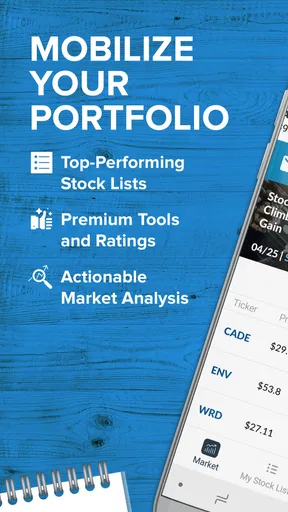
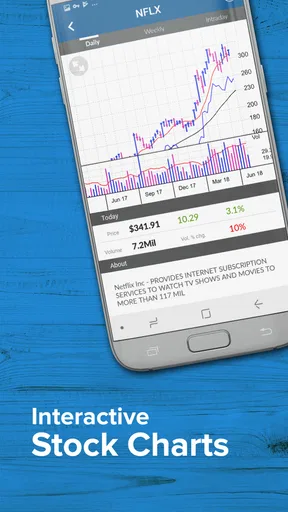
One of the standout features of this app is its stock analysis tools. Seriously, it feels like you’ve got a Wall Street guru whispering in your ear. The app offers in-depth stock charts and data, making it easier to make informed decisions. Want to know how your favorite stock is doing? Just a few taps, and you’re there.
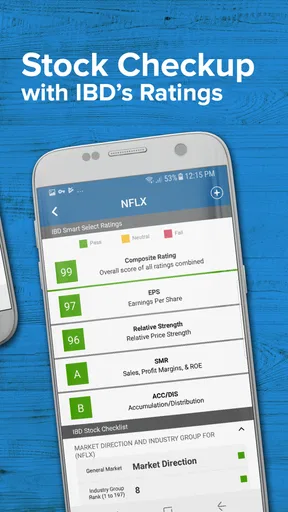
Another fantastic tool is the IBD SmartSelect Ratings. This feature gives stocks a score based on various metrics, making it simpler to identify potential winners. It’s like having a cheat sheet for the stock market, and who doesn’t love a little extra help?
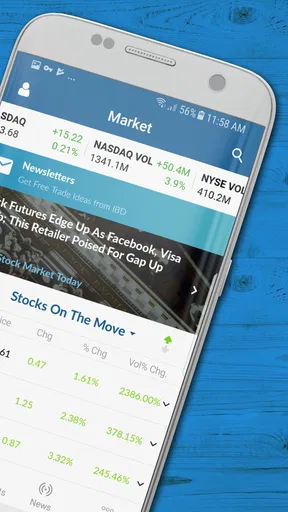
The app also comes with a section dedicated to the latest financial news. Updated in real-time, it ensures you’re never out of the loop. Plus, the articles are concise and to the point, so you won’t get lost in a sea of words.
Personalized Experience
Customizability is where this app shines. You can tailor your experience by creating personalized watchlists, keeping track of stocks that matter most to you. It’s like having your own curated financial newspaper, delivering only the news you care about.
The app’s alerts feature is another winner. You can set up notifications for stock price changes, news updates, and more. This means you’ll never miss a beat, even on your busiest days. It’s like having a financial assistant who never sleeps.
Ease of Use and Design
Now, let’s talk about the design. The app’s interface is clean and intuitive, making navigation a breeze. Even if you’re not a tech whiz, you’ll find it easy to jump between sections and access the information you need. It’s clear that a lot of thought went into making this app user-friendly.
The color scheme is pleasant, and the font is easy on the eyes, which is crucial for those of us who spend hours poring over financial data. Plus, the app is fast and responsive, so you won’t be stuck staring at a loading screen when you need information quickly.
Final Thoughts
In a world where financial markets can feel like a never-ending rollercoaster, Investor's Business Daily offers a bit of stability. It’s like having a reliable friend who’s always ready to offer sound advice and keep you informed.
Whether you’re a seasoned investor or just dipping your toes into the stock market waters, this app provides the tools and insights you need to make informed decisions. With its blend of powerful features, ease of use, and up-to-date news coverage, it’s a must-have for anyone serious about investing.
If you’re ready to take control of your financial future, give Investor's Business Daily a try. Trust me, once you dive in, you’ll wonder how you ever managed without it.
Pros
- User-friendly interface simplifies navigation.
- Comprehensive market analysis tools included.
- Real-time stock updates keep users informed.
- Customizable watchlists enhance user experience.
- Educational resources for all investor levels.
Cons
- Subscription required for full access.
- Occasional app crashes reported by users.
- Limited features in the free version.
- Some charts lack advanced customization.
- Notifications can be overwhelming at times.
FAQs for Investor's Business Daily
What features does Investor's Business Daily offer?
Investor's Business Daily (IBD) provides a range of features designed for investors. These include stock analysis tools, real-time market news, and the IBD SmartSelect Ratings. Users can access customizable stock watchlists and educational resources to improve investment strategies. The app also offers premium content for subscribers, providing deeper insights and exclusive analysis.
Is Investor's Business Daily free to use?
Investor's Business Daily offers both free and premium content. While users can access basic features and market news for free, advanced tools and in-depth analyses are available through a subscription. The app provides various subscription plans, including monthly and annual options, catering to different user needs and budgets.
How user-friendly is the Investor's Business Daily app?
The Investor's Business Daily app is designed with a user-friendly interface, making it accessible for both novice and experienced investors. The navigation is intuitive, with easily accessible tools and a clean layout. Tutorials and guides are available to help users get acquainted with the app’s features, ensuring a smooth user experience.
Can I customize notifications in Investor's Business Daily?
Yes, the app allows users to customize notifications to stay updated on market changes and stock alerts. You can set alerts for specific stocks, market news, and updates on your watchlist. This feature ensures that users receive timely information tailored to their investment interests and strategies.
Is Investor's Business Daily available on both Android and iOS?
Investor's Business Daily is available for download on both Android and iOS platforms. The app is optimized for smartphones and tablets, providing a seamless experience across devices. Users can download it from the Google Play Store for Android or the Apple App Store for iOS, ensuring wide accessibility for all users.


